
To start a personal discussion with an individual contact, follow these steps:
- Access the Discussions Section
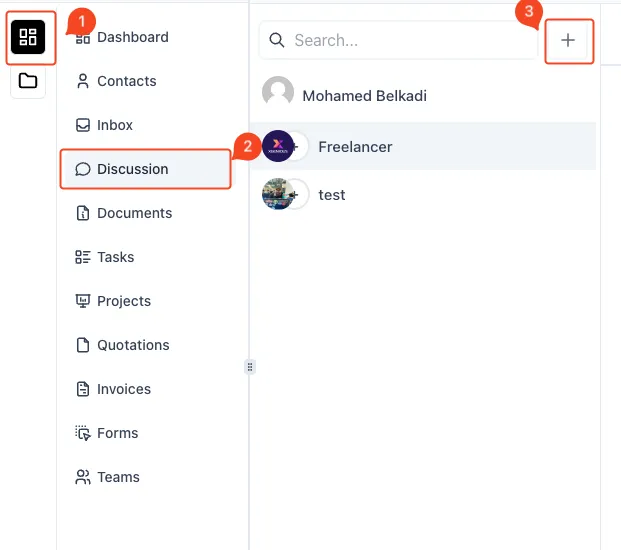
- On the left-hand sidebar, click on the Menu Icon (1).
- Select Discussion (2) from the menu to navigate to the discussion area.
- Initiate a New Discussion
- Click the Plus Icon (3) located in the top-right corner of the discussions list to create a new conversation.
- Choose Conversation Type
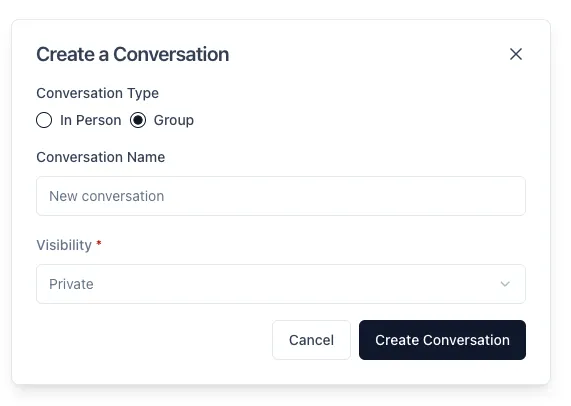
- In the Create a Conversation modal, select Group as the conversation type to create a group discussion.
- Name the Conversation
- Enter a suitable name for the group discussion in the Conversation Name field.
- Set Visibility
- Select the visibility of the conversation from the Visibility dropdown (e.g., Private or Public).
- Create the Conversation
- Once all fields are filled, click on the Create Conversation button to initiate the group discussion.
By following these steps, you can easily set up and manage a group discussion to facilitate communication among multiple contacts.