
Integrations extend Taskip’s functionality by connecting it with the tools you already use.
From importing contacts and managing conversations to securing forms and automating workflows, integrations help streamline your daily operations.
Available Integrations:
| Integration | Purpose |
| Propovoice | Import contacts from existing Propovoice plugin |
| Manage client conversations from WhatsApp within Taskip | |
| Google reCAPTCHA | Add CAPTCHA protection to forms |
| Cloudflare Turnstile | Alternative CAPTCHA solution for forms |
| Zapier | Create automated workflows between Taskip and other apps |
| Google Meet | Schedule and manage Google Meet meetings |
| Zoom | Schedule and manage Zoom meetings |
| Envato | Verify customer purchase codes for support tickets |
- Go to Settings → Integrations
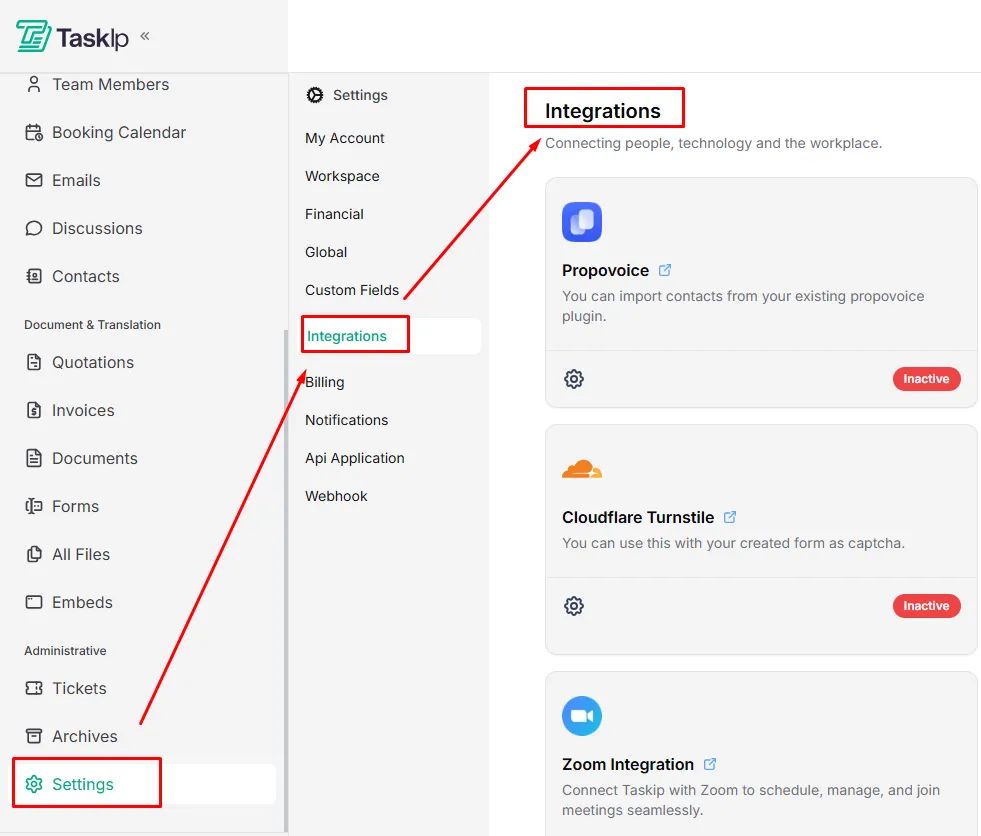
- Locate the integration you want to enable.
- Click on the Settings icon.
- Follow the on-screen instructions based on the integration type:
- OAuth-based services (Google Meet, Zoom):
Sign in and authorize access. - API-based services (Zapier, Envato):
Enter your API credentials. - CAPTCHA services (Google reCAPTCHA, Cloudflare Turnstile):
Enter your Site Key and Secret Key.
- OAuth-based services (Google Meet, Zoom):
- Complete the authorization process when prompted.
- Once connected, the integration status will change from Inactive to Connected.