
Ensure participants are notified ahead of scheduled meetings.
Steps to Set Up Automatic Reminders:
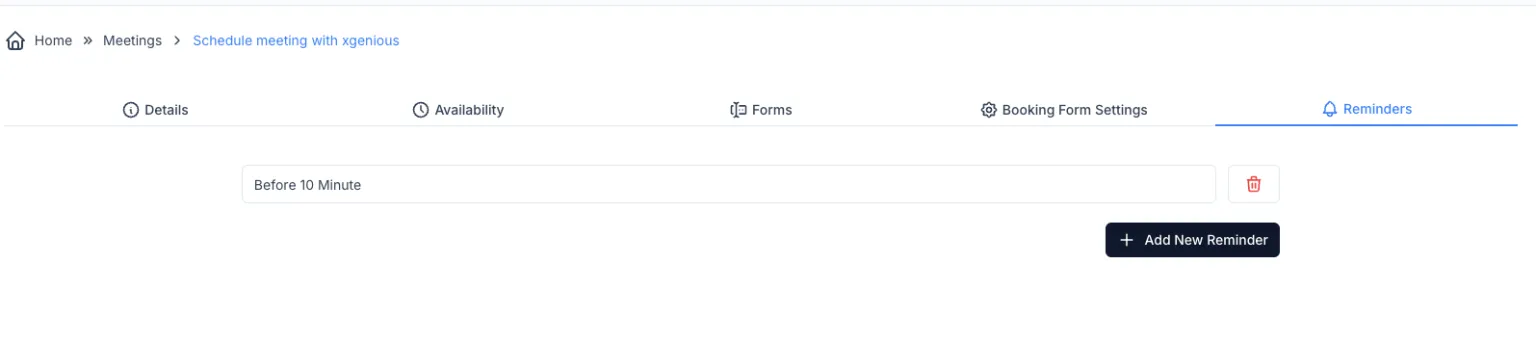
- Navigate to Reminders Tab:
- In the meeting settings, click on the ‘Reminders’ tab.
- Add a New Reminder:
- Click on the ‘+ Add New Reminder’ button.
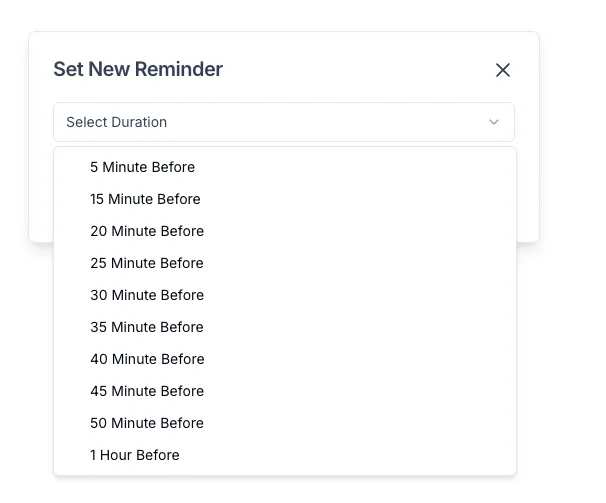
- Set Reminder Duration:
- From the dropdown menu, select the desired reminder time (e.g., 10 Minutes Before, 30 Minutes Before, 1 Hour Before).
- Save Reminder:
- Click on ‘Save’ or confirm the selection.
- Delete Reminder (Optional):
- Click on the Trash Icon next to an existing reminder to remove it.
Best Practices:
- Use multiple reminders for critical meetings.
- Set reminders at intervals like 1 hour before and 10 minutes before.
- Regularly review reminder settings to match meeting importance.
That’s it! Your meeting reminders are now configured and participants will be notified automatically.