
To start a personal discussion with an individual contact, follow these steps:
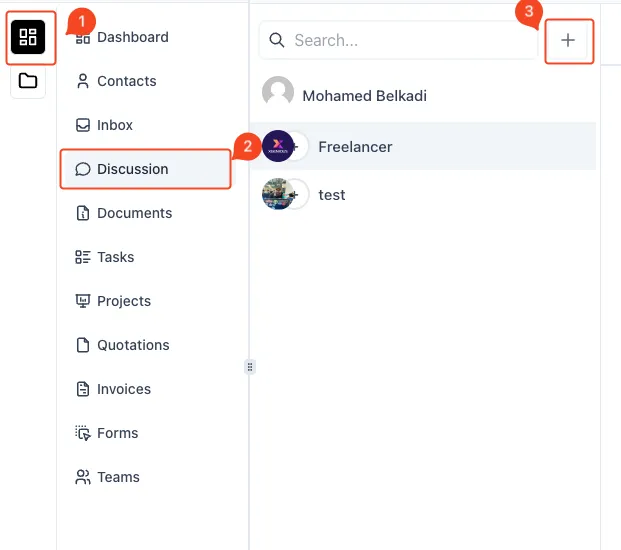
- Access the Discussions Section
- On the left-hand sidebar, click on the Menu Icon (1).
- Select Discussion (2) from the menu to navigate to the discussion area.
- Initiate a New Discussion
- Click the Plus Icon (3) located in the top-right corner of the discussions list to create a new conversation.
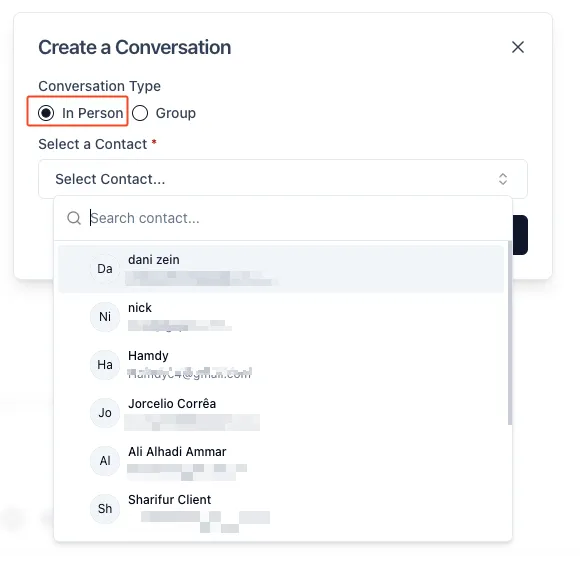
- Choose Conversation Type
- A modal window titled Create a Conversation will appear.
- Select In Person as the conversation type to have a direct discussion with an individual contact.
- Select a Contact
- From the Select a Contact dropdown, search for and choose the contact you wish to start the conversation with.
- Once selected, proceed with the conversation to begin the personal discussion.
This process allows you to create and manage individual conversations with your contacts effectively within the discussion module.