
To cancel a meeting, follow these steps:
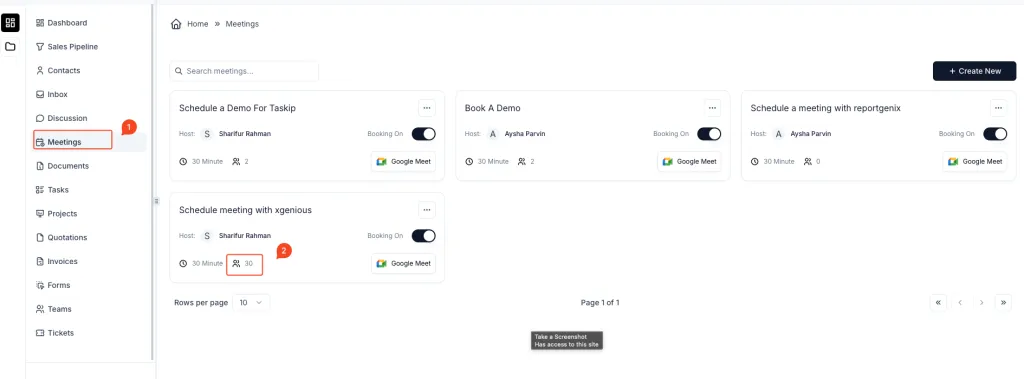
- Go to the “Meetings” section
- Navigate to the Meetings module from the left sidebar.
- Open the Booking List
- Locate the meeting you want to cancel.
- Click on the number of attendees (represented by the people icon) to open the list of bookings.
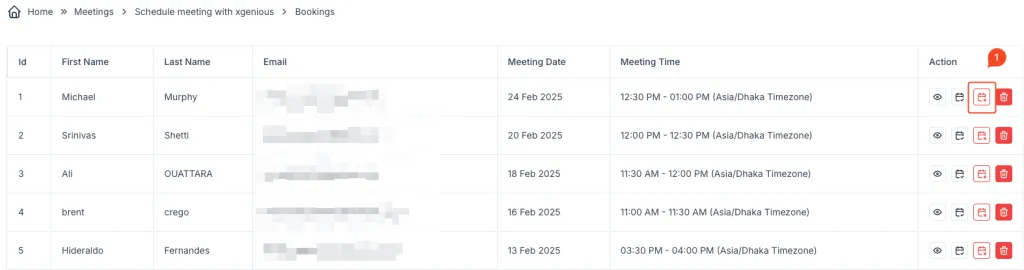
- Click the Delete (Trash) Icon
- In the Action column, find the booking you want to cancel.
- Click on the calendar cross icon next to the respective booking.
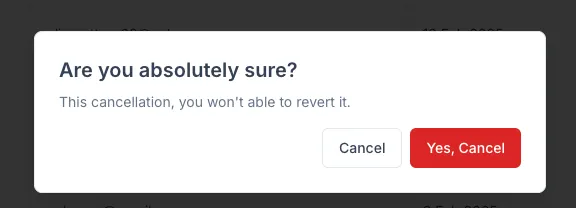
- Confirm the Cancellation
- A confirmation popup will appear, asking:
“Are you absolutely sure? This cancellation, you won’t be able to revert it.” - Click “Yes, Cancel” to confirm the cancellation.
- A confirmation popup will appear, asking:
Once canceled, the meeting will be removed from the list, and the attendee will no longer have an active booking.